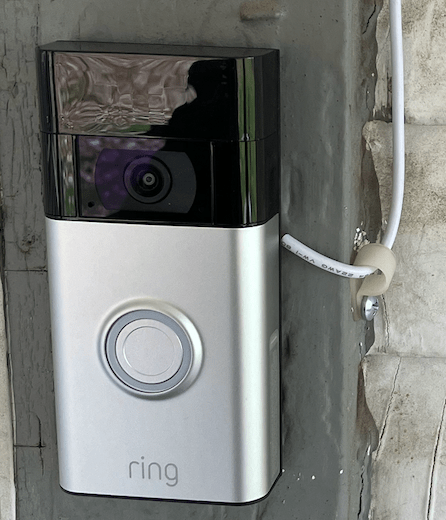
BLUF: Great capability for a laughable price.

I give this security system a four and a half star overall rating. Why four and a half stars? Well, keep reading and I’ll lay it all out for you.
I am late to the home security game, as I could hardly describe myself as an early adaptor. I’m a tad allergic to technology, and I struggle with basic tasks on my phone and computer that others would find trivial. So, I only do things when I must, and, being on a fixed budget (Army pensions, while good, will never make you rich), I tend to pay attention to dollars and cents.
One of my afflictions is paranoia and worst case thinking. There’s not a lot I can do about it, I’ve seen terrible things happen and unlikely, deadly scenarios unfold before me. I have used firearms for self defense, for offense, and to defend others around me. I guess, looking back at things, that I’ve lived a violent life. It’s a source of sadness and regret.
This is one of the reasons that vacations are difficult for me- not only do I feel helpless as a traveler, but I fear that something catastrophic will happen to my home and loved ones in my absence. It can really ruin things for me when I should be relaxing and enjoying the sights. This nagging feeling makes it so that I want to cut the vacation short and hurry home when I should be enjoying a break.
It’s not a break for me. It’s torture.
This is my reality, and it can be hard to live with. The VA has done what they can, but the feeling, that everything can be taken from you in a split second, remains.
It’s the Soldier’s Sickness, in living color. Not a day goes by that this isn’t a vexation and burden.
Which makes me wonder why TF I didn’t buy a Ring system years ago. See above, I guess. I wanted mature, reliable and easy to use tech, and oh yeah, it had to be inexpensive.
Enter the 2023 Ring system, seemingly designed for guys like me. Wow. What a device, and how relatively easy to tie into a complete package.
Where even to begin?
I guess with the device itself, the Ring doorbell that is much more than a doorbell. On a Black Friday sale, I got the Ring doorbell package, which included an indoor cam- this struck me as a handy capability, both outdoor surveillance and an indoor monitor. I really didn’t want the indoor cam on all of the time for privacy concerns, so I figured I’d set it up when we went on a trip. Easy peasy, right? I clicked “buy,” I think I got the package deal for 69 bucks, a real bargain. BTW, this is why I always buy electronics and high ticket items on either Black Friday or Amazon Prime Day. There are real deals to be had. However, 139 for the bundle, which is the regular price, is still a bargain for what this thing does.
The devices showed up a few days later. I unboxed them, but waited to install until I had a solar charger. There are many options, but make sure you buy one specifically for the Ring doorbell. My ancient house had indoor door chime wiring once upon a time, but it was defunct in my childhood. So, I needed a power source that didn’t involve routing new wires. I also didn’t feel like pulling the Ring from its mount every couple of weeks to recharge it, which is an option. Therefore, I bought a solar charger from Amazon, and as far as I can tell, it works as advertised. But I’m getting a little ahead of myself.
OK, when I had the complete system, Ring devices along with the solar charger, I no longer had an excuse not to install them. I also remembered an Echo Show 8 device that we received as a freebie when I changed cell phone service a couple of years ago. I had never unboxed it because I wasn’t sure what to do with it.
Well, now it’s being used, because I discovered that the Echo interfaces with the Ring system nicely.
So, here is what I started with. One Ring doorbell, an indoor cam, the solar charger, and an Echo Show 8. All were brand new, and I had to figure it out.
It made sense to me to have the power source ready before I did anything else, so I unboxed the solar system first and installed it. This was pretty easy, but the supplied power cord was too short. It was easy to lengthen, however, and I did so. Then, at the end that would hook to the Ring doorbell, I made sure to test the power leads (BTW, at this step, make sure your voltmeter is set to VAC, not VDC). You always want to do this to ensure that your device is being powered. If you are using the home wiring, please remember to turn off power. Kind of important.
Viola, without too much effort, I had power. See below.
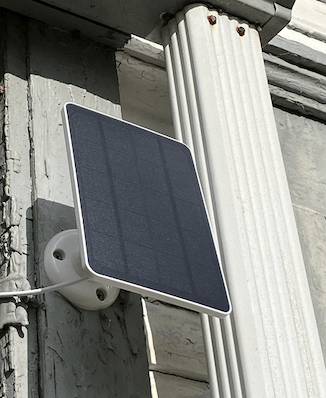
I installed it on a southern exposure, which is the best in the Northern Hemisphere. Then it was time to install the doorbell.
It was pretty easy. I made sure to use a level. The only part that was tricky were the tiny power lead screws. I dropped them several times while fiddling around with the power wires. The device doesn’t care about polarity, so you can stick the red and black wires wherever. I followed the instructions in the app (which I had to download), and powered the device on. It worked immediately, but I needed to tailor its use.
This is where the half star comes in. Geez, did I have to mess with the apps, both Ring and Alexa, to get my doorbell and Echo Show 8 to work together in the manner that I wanted them to.
Speaking of the Echo Show 8, my next step was to pair that device with the Ring doorbell.
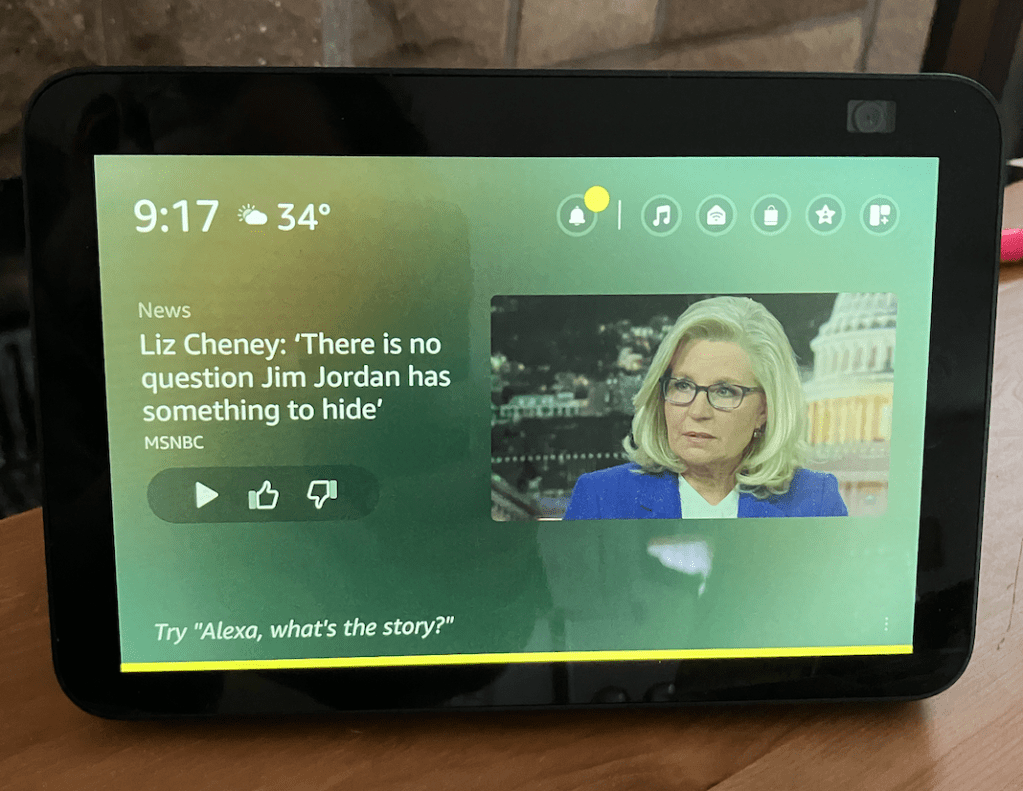
On its own, the Echo is an impressive device. I soon learned that once paired with the Ring (Childishly simple. This is an advantage of using all Amazon platform devices.), it serves as an extension on your home security system. Note the cam in the upper right corner of the device.
One of the concerns I had with an indoor cam was privacy issues. This is why I only wanted to install my package-deal cam when we left for vacation. However, the Echo comes with one automatically. How was the privacy factor addressed by Amazon?
In my estimation, adequately. Why. Two reasons. First, you can view the feed from the Echo cam at any time via the app. However, for the cam to be turned on, you must press LIVE FEED in the app- when this happens, the Echo’s screen displays, clearly, that someone is using the cam. Also, there is a physical barrier that can be placed over the cam in the form of a sliding door in the top of the device. I was satisfied, and I learned that I could view what was happening in my living room from anywhere in the world with cell phone service by simply going to the Alexa app and pressing on the CAMERAS tab.
This was super cool, and it eliminated the need for an extra cam under normal use. However, I do plan to install the Ring indoor cam while on vacation in a sensitive area of the house. Perhaps in the basement, just to monitor the house plumbing. Until you have dealt with a pressure plumbing emergency, you do not know how handy this could be. This would, under ideal circumstances, be a very boring view. But if something goes wrong, it could be a lifesaver.
So far, so good. However, there was one flaw that I didn’t like. While the Ring cam is amazing in detecting human motion at my front door (it does not pick up animals, or my Ring notifications would be non-stop) and it paired with the Echo using verbal and on-screen notifications, it did not instantly display a live feed from the doorbell cam when the Ring cam detected motion.
Now, to be clear, I could easily bring up the Ring app and go to its feeds, or I could manually bring up the feed on my Echo. However, that involves an extra step, and I wanted the front door feed to instantly display on my Echo, so that at a glance you could see who could be messing around on the porch.
From a simple Google search, I knew that the Echo and Ring, working in tandem, had this capability. Yes, the Echo would automatically bring up the Ring cam feed if someone pushed the doorbell, but the notification combined with the extra step of getting into the app annoyed me for events that involved human-motion only. I can imagine several scenarios where someone would be in front of my house and would not choose to advertise their presence by ringing the doorbell. Therefore, I wanted maximum instant notification options.
Friends, this took me a while to figure out. It turned out that if you go into the “Routines” tab in the Alexa app, you can manually type in the proper command for Alexa to bring up a live feed whenever human motion was detected. It took me several tries to get the proper manual wording for my routine, the phrase was “show front door.”
Once I had this figured out, and I learned to properly save the routine, I was set. But it took my ham-fisted self a couple of frustrating hours watching YouTube vids to get it.
Now, I am all set up, and at any time I can bring up my apps and check things out. If I sit here and type, and someone comes on my porch and doesn’t knock, both Ring and Echo will dime them out long before I would otherwise realize that someone is out there using my RPG blasted ears. It’s perfect, and it buys me precious time in case I need to react. Also, at any time I can check the function of my components using the app. See below.
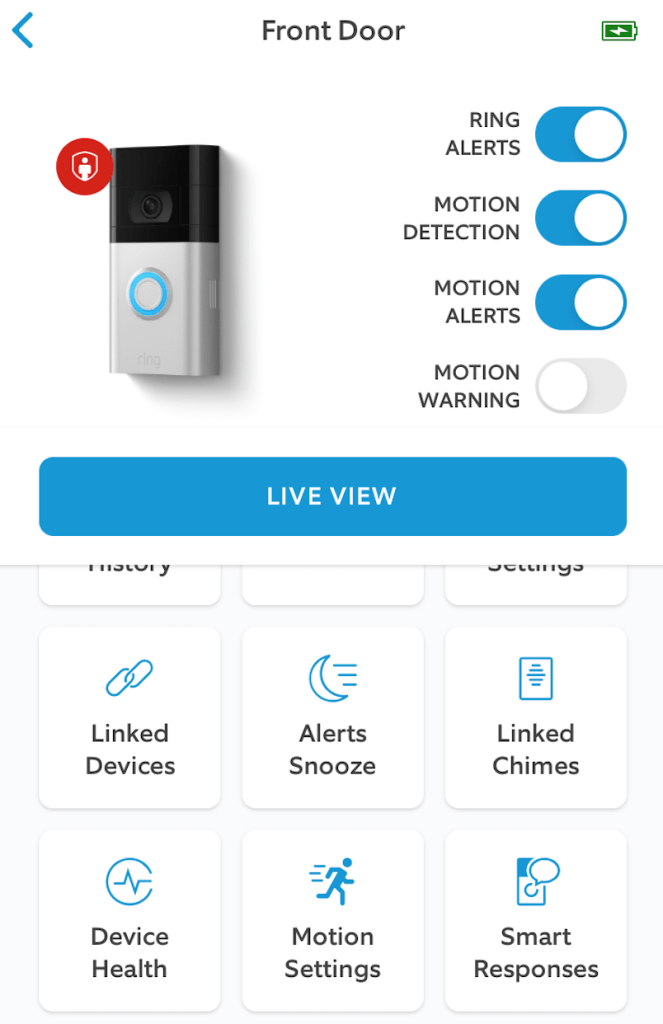
It’s too easy, and for a minimum cost, it’s peace of mind. I also subscribed to the Ring cloud service- for about forty bucks a year they will store your recordings (possibly handy for any law enforcement interactions) and there’s some other bennies that come with the service.
Total cost involved less than two hundred bucks. Peace of mind? F’n priceless. Ten years ago, this level of security was only available to those with deep pockets, or gadget nerds. These days, anyone can do this. And BTW, the Ring is night-vision capable, and even if someone smashes it with a hammer, you will get a recording of them doing so. It is a powerful deterrent.
One last note. A lot of people have a problem with these sorts of devices because they think The Man will spy on them. Well, I don’t doubt that this is true, and there are justified concerns about what Amazon does with the data. However, I will counter with the fact that even if you don’t install such a system, you are screwed anyway. Do you have a cell phone or internet? Guess what. Everything you do can be tracked with a subpoena, and your data will be harvested no matter what. Wear a tinfoil hat and use the computer at the library? Your new car will rat you out with location data and its onboard electronics. Drive a 1970 GMC truck, straight Luddite shit? Do you go to Walmart or use an ATM card? Still screwed.
You might as well use the tech that’s out there. The Man could care less about your furtive sexual activity, for example, and if you’re really concerned about that, then don’t keep anything electronic in the places that you do stuff. It’s that simple.
For a guy like me, this is great. For everyone else, it can be damn helpful, too. On balance, this tech is a godsend. It’s up to you to judge the pros or cons.
Highly Recommend.
 The Interstellar Valley
I love my Ring cams. I have a doorbell, one outdoor cam (on solar) and one interior cam. The outdoor and doorbell cover about 80% of my front yard and sidewalk. It has been invaluable in deterring dog walkers from not cleaning up after themselves. Its amazing what a quick word with a neighbor who is NOT cleaning up will do, or in one case, a public shaming on NextDoor. Makes for a much more pleasant mowing experience!
I may want to try the outdoor with flood light at some point for that last 20% (driveway and garage) to give some more coverage for my cars.
LikeLiked by 1 person